
One of the first things I wanted to improve in the admin area of my WordPress blog, back in the 1.5 days, was the header menu. I wanted to be able to reach any admin page in one click, instead of first clicking on the first level link ("Manage" for example) and then only on a submenu link ("Comments") So came a very neat plugin : the WordPress Admin Drop Down Menu
When WordPress 2.7 and its new and optimized user interface came, I thought there was still room for improvements: a horizontal menu gave the admin area more of a "desktop application" feel, and I think it's superior to a vertical menu. So I updated the WordPress Admin Drop Down Menu.
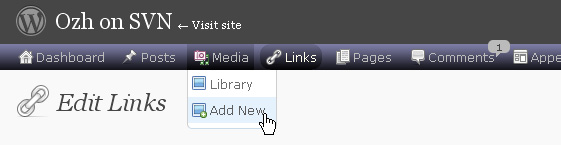
Download
Get the plugin :
ozh-admin-drop-down-menu.zip
Extract and upload to your blog, preserving directory structure.
Note: download counter here and stats on wordpress.org may differ and reflect the number of downloads before this plugin was hosted on the plugin directory
Activate and enjoy. Another friendly install & forget piece of PHP.
Features
- Customizable color scheme with a neat color picker
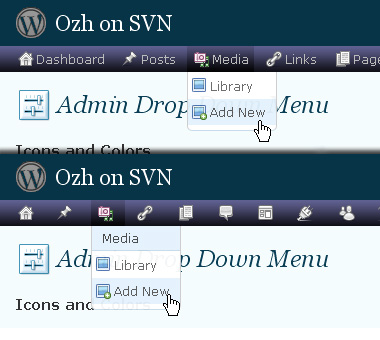
- Normal mode for regular users, compact mode for real estate maniacs, minimal mode for those who never have enough
- Optional cute icons from FamFamFam
- Enhanced compatibility with handheld devices
- Joy and happiness for every day
Javascript is involved for advanced features and to make stuff compatible with MSIE6, but on any decent browser everything works even with Javascript disabled.
Super neat color picking.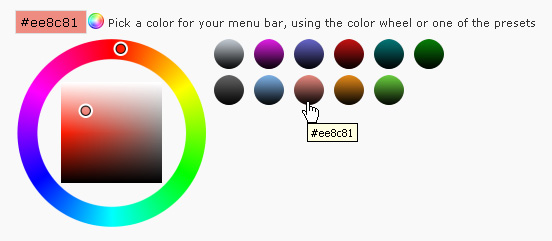
Any color you'll love.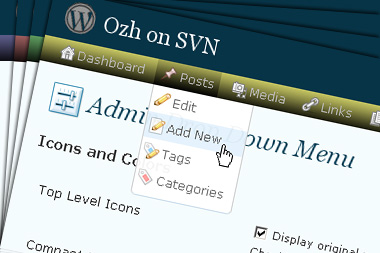
Normal or compact display.
Browser compatibility
The plugin has been developed on Firefox 3, Chrome and MSIE7. It should do fine with MSIE6 and Safari too.
There are glitches with Firefox 2 and Camino which both use a deprecated rendering engine. There are also glitches with Opera. I won't fix these, but if anyone wants to submit a CSS patch to resolve one of these issue, you're welcome :)
Developer friendly
The plugin comes with a wickedly cool API that will allow other plugin developers to interact with it, like adding your own custom icon for your plugin. Read the API for Coders page for examples and documentation. Also, all elements the plugin produces get custom CSS classes and id's to allow easy styling or selecting.
Translations
The plugin is ready for interglobanalization and there is a .pot template file included so polyglots can even make their own translation and sent the .mo and .po files to me that I'll include in the package.
The plugin comes with the following translations, in no particular order:
- Turkish, thanks to Baris Ünver
- Korean, thanks to Jong-In Kim
- Spanish, thanks to Karin Sequen
- Italian, thanks to Gianni Diurno
- Deutsch, thanks to Frasier Crane
- Russian, thanks to Fat Cow
- Brazilian Portuguese, thanks to Renato Tavares
- Greek, thanks to Friedlich
- Belorussian, thanks to ilyuha
- Hebrew, thanks to Amiad Bareli
- Romanian, thanks to Octav
- Ukrainian , thanks to wpp.pp.ua and Jurko Chervony
- Traditional Chinese, thanks to Paogray and Joan Wang
- Dutch, thanks to Cees van den Heuvel
- Slovak, thanks to Branco from WebHostingGeeks.com
And maybe more since I might totally forget to update this list :)
Older Versions
All my plugins are designed to run on the latest WordPress version available. Upgrade WordPress whenever a new version is out, or be sorry when your site gets compromised.
If for some unintelligent reason you need to get an older version of this plugin, it might be available, yet totally unsupported or recommended. Check here: Other versions.
Feedback, Bug report, Feature request
Sure. Feed me back. Like it? Blog about it. Love it? Click on the download link, see the Paypal button appear, and give it some clicks!
If you're reporting bugs, you're welcome, but please provide a screenshot and informations about your browser & your OS. I'm not supporting deprecated blogs or plugins or browsers, and I can't respond to incomplete bug reports.
If you're suggesting a feature, you're welcome too, but I won't add an admin menu on the public side of the blog, on top of pages. If you're looking after having this menu fixed on top of page, check this companion plugin that works as a plugin to this plugin: Admin Menus Fixed.
Hi Ozh,
I'm using your plugin now with Opera 9.51. It seems to work fine. The horizontal on settings runs too far to the right, but I can live with it. I have to arrow over.
I was using MW Adminimize: http://meyerweb.com/eric/tools/wordpress/adminimize/. I like how that plugin restyled the blog name and some other aspects. It makes them smaller.
Perhaps you could incorporate some additional styling for your next release.
Good job.
I'm also using your Absolute Comments plugin and look forward to the next version.
Thanks,
Tom Usher
[…] Ozh' Admin Drop Down Menu: altera os menus da área de administração do wp por uma barra com menus drop down muito mais práticos; […]
WP???????: 4Avatars, WP-Super Cache, Fluency Admin, Meet your commenters…
??????????????????WordPress??????????????
???????????????????????????????Gravatar?Mybloglog?Avatars.pl?????4Avat…
[…] Admin Drop Down Menu – Torna o painel de administração mais simples de navegar […]
[…] we speak about WordPress plugins, I recommend you this uber-excellent plugin by Ozh (copinage powered). Really cool, light, very useful for forefinger-lazy bloggers like […]
The ozh-admin-drop-down-menu plugin is a must have! It will save you time and alot of clicks. This plugin should definitely be integrated into the next wordpress version.
BIG Thank You to OZH for this plugin!
[…] admin page* from *any admin page*.The lazy and the productive will love it ^^. Plugin Homepage : http://planetozh.com/blog/my-projects/wordpress-admin-menu-drop-down-css/ Download the lastest version : […]
[…] Admin Drop Down Menu – ????????????? […]
[…] Ozh' Admin Drop Down Menu ?????????????????????????? […]
[…] OZH Admin Plugin wurde von dem Franzosen OZH aus Nantes entwickelt und wird auf dessen Blog kostenlos zum Download angeboten. Unter anderem hat OZH auch das Plugin "Who sees Ads" entwickelt. Damit […]
[…] just committed version 2.3 of the mother of all admin menu plugins, Admin Drop Down Menu, and there are some pretty hot stuff inside. Plugin coders, be sure to read this till the […]
many thanks for the great plugin. i have it now on my site http://www.per-autopilot-zum-reichtum.de/ live on the deployment. It works fine!
regards tobias
Bug report: in the latest version, when the display icon is disabled, the following embedded style is still there, which should be removed:
#oamsub_ozh_admin_menu a {background-image:url(/wp-content/plugins/ozh-admin-drop-down-menu/inc/images/ozh.png);}
[…] Admin – cleans up the whole admin interface Admin drop down menu – add's drop down menus to the Admin pages and is compatible with Fluency Admin One Click […]
Really loving the icons in 2.3 – are they the ones by FamFamFam?
Anyway, keep up the good work!
Tom
I'm digging the icons. :)
Are you going to give plugin authors a primer on how to activate icons for their own plugins?
Beautiful plugin, even more so as of 2.3 ;)
Seems to have trouble with the WP-Gravatars plugin, tho (link becomes 'wrong').
You might look into that.
(talkin 'bout wordpress.org/extend/plugins/wp-gravatar)
Seems like i have to try fuency again, last time it was kinda broken.
Marcus » Indeed. This should be fixed in 2.3.2 I've just committed. Thanks for the feedback!
About Fluency, I've heard that it's more or less clunky with icons enabled, I may have a look at this later.
[…] habe ich das Lighter Menus-Plugin, das ich seit der Version 2.5 einsetze, gegen das Ozh' Admin Drop Down Menu-Plugin ausgetauscht. Beide stellen die Untermenüs im Admin-Bereich schicker und funktionaler als […]
[…] Ozh' Admin Drop Down Menu In der Administration werden übersichtliche und schicke Drop-Down-Felder anstatt der üblichen Navigation angezeigt. […]
Wow, that was quick!
Too bad i rewrote the plugin to work with the old version so i can't really check it out now…
as for the icons with fluency, some extra padding-left (~22px) for #ozhmenu li.ozhmenu_toplevel ul li.ozhmenu_sublevel a should be sufficient ;)
oh, the 'break long lists' option doesnt work with fluency (24 entries in 'Settings'… got a few more pixels left tho) ;)
hi. Thanks for plugin
perfect.
best Regards
The new update from today certainly fixed the infinitely repeating icon for the settings page of this plugin, Thanks.
But now I notice that on the settings drop down, the link for one of my plugins is getting cutoff pretty badly. The plugin is called "SimpleModal Contact Form". It cuts off the end of it because the name is too long, while before it simply made the menu wide enough to fit.
I also use the fluency admin css plugin, great plugin, but I do not know which of these two is causing the problem. Can you check out the menu width and see if you can fix it to adjust for its contents?
yes, unfortunately, doesn't look too good with fluency… might also be nice to not have to have plugins modified to show icons… maybe search the plugin page directory of the current admin page for an image with the same name and use that… then, no need to wait for plugin authors or mod their stuff…
Head's up Ozh!
You might want to take a look at the latest "bleeding" WordPress 2.7. The menu is now on the side (as Fluency does it). You should probably drop a line to wp-hackers to see if that's the final design….
Hi and Thanks for the plugin. I am having some trouble with it in Safari for Mac OSX (3.1.2 (5525.20.1)).
It looks like in the CSS that the top-border of #wphead is expanding to ridiculous sizes.
Best,
Michael
Stephen R » Yeah, saw this. Once again a total revamp that will break everything, maybe… Will wait for 2.7-RC1 or beta to update.
Bryson » I think it should be fluency, check without enabling it.
Do you have a beta version or the likes that works with the sidebar menu in 2.7-Bleeding?
Matt » Not yet. I'm not going to spend time working on CSS nightmares against a version of WP that will still heavily change. I'll get things compatible when a beta or a RC comes out.
[…] You can find the plugin which goes by the name Admin Drop Down Menu here […]
[…] Download Admin Drop Down Menu Plugin here. […]
[…] Ozh' Admin Drop Down Menu – ??????? ?? ?????? ????? ????? ?, ?? ? ??????? ???? ????? ???????, ? ??? ?? ?????? ?? ?? ?????? ?? ???? ???. ???? ???? ?????? ?????? ??????? ?? ???????? ???? ? ??????????????? ?? ?????? ? ??????? ????? + ?? ??? ???????? ?????? ???? ?? ????????????. It makes my life easier :) […]
Wonderful plugin. I wanted to report a bug in Safari 3.1.2. I never noticed this until today, well maybe it's the latest version of Admin Menu 2.3.2. The menu becomes over-extended in this case making the entire screen turn the dark grey of the background. Scrolling down the page reveals the remainder of the WordPress information. I removed class='ozhmenu_toplevel' from the line item on line 28 in the core.php file and all seems well again.
I couldn't find a css class for this so I'm wondering if it's needed? I've been running like this for about five minutes so if I see any problems I will report them later. Is there a better fix for this issue?
Thanks
I'm having the same Safari issue as 'Doc4' described above. The dark menu is overextended vertically. Everything still works, but it just looks very clunky.
Great plugin! I'm sure you'll find a fix for this with the next release.
Cheers, Tim
Tim & Doc4 » this will be fixed in a few hours! :)
If I click on Comments I get a message that says "Cannot load edit-comments.php?page=disqus."
ghosttie » I've just checked the disqus plugin you're using, and this is very questionable code, no wonder it's breaking. I've made a quick plugin that will fix Disqus crappy code, but with no additional support on this.
[…] is another update of your favorite plugin, the ubermighty Admin Drop Down Menu. I'll make it […]
i, too, am suffering from the "gigantic grey block in safari" issue.
please help! i love your plugin but am so sick of scrolling!
The break long list option does not work with fluency enabled?!
Is that supposed to work? Or is it too hard to make that work?
But still a very great plugin. For me it's hard with too many options under the settings tab. So, if i want to use it with fluency, i really need the break list .. :-(
I am also having this problem with the large grey block, with all of the links listed down the left side of the page below that. I have 12 blogs using this plugin, and the problem just started about 2 updates ago, that is updates to your plugin, prior to that it worked fine, and is only on one site. Are there any known plugin conflicts? I have a lot of them, and most of them are on all of my sites. Help Please…
David
chris tolles & CarpetGuy » Oops, my bad, I actually forgot to upload the new version of the plugin :) Get it again, it should be fixed.
Ron » No, this is not enabled with Fluency.
Is it not possible to work?
[…] for Mac users who use the best browser ever – Safari – like me. So he updated his cool Admin DropDown Menu for better integration with all versions of Safari and other folk-browsers. It now also supports […]
The new version has not fixed the issue that TIm & Doc4 have mentioned for my blog. Still have a huge scroll down issue…
TeraS
Hi,
the plugin works great for me, but the code ist not valide xhtml. can you check this? & -> &, one id for two div, style in body…
[…] The first plugin i would like to talk about is Ozh's "Admin Drop Down Menu". […]