
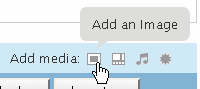
 Go to your blog admin area, head to the "Write" page, move your mouse over the "Add media" tiny icons: you probably had noticed it already, WordPress 2.5 comes with a neat tooltip function. Using it in your own plugins is so easy that a hamster could do it.
First, in the HTML output of your plugin page, add a new classname — say "givemesometips" — to some elements, and give them a meaningful title.
- <p>The question mark hides a tooltip! <span class="givemesometips" title="Hello, I am a tip">?</span></p>
- <p>This image too! <img src="someimage.gif" alt="some image" title="I am a tip, too!" class="givemesometips" /></p>
Now, somewhere in your plugin page, add this Javascript call:
- <script type="text/javascript">
- jQuery(document).ready( function() {
- jQuery('.givemesometips').tTips(); // tooltipize elements with classname "givemesometips"
- });
- </script>
And that's it. If your hamster cannot do this, consider upgrading it! For your convenience, here is a sample dummy plugin with tooltip examples in the page it creates under the Setting menu. Have fun!
Comments are closed.